
Tobias Zwingmann recommended some AI based productivity tools so I decided to try Otter which
1)records meetings,
2)provides a transcript and
3)provides a beta meeting summary
4)Shows % time allocation for each speaker
5)Provides summary of Keywords from the meeting (not sure how weighting is assigned here)
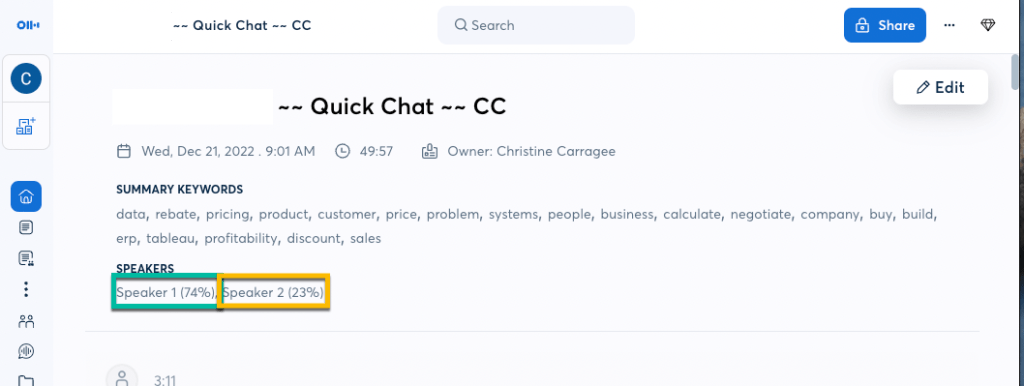
Its pretty cool, but I’d give it 3/5 stars for the following reasons:
1) The purchase was non-refundable, no test period
2) Transcription is about 80% correct my 7 meetings all in english with a variety of speaker accents on fairly technical topics. You can use the recording to play back any section where the transcription seems incorrect and then manually correct the text
3)Summarization is still beta but could use a better visual structure and some way to give it focus areas ahead of the meeting — eg provide the agenda and then have it “listen” for on-topic content or “action items” and follow up steps.
4) Data security [Fatal flaw]— I can’t use this for either of my clients because of data security concerns. The service is hosted and writes back to Otter, rather than allowing the user to chose a storage location behind their firewall.
Hack: In the past I sometimes recorded meetings, then loaded the mp4s to YouTube as private to generate a transcript, but this is a cumbersome process with similar security concerns.
I love the idea of having full meeting transcripts and recordings to facilitate asynchronous work. The vision for me is to enable more collaboration (especially on global teams) and to free up the presenter (often me) to focus on listening and adapting rather than note taking.
With all the talk of women taking on roles that benefit companies and teams, but don’t result in their advancement, I think AI that takes meeting minutes will eventually help, but there are some hurdles left to solve for.
 Carragee Consulting
Leave a comment